Premium and Fees
In exchange for the services we provide, our customers owe us money, in the form of a recurring fee. Our billing system computes and stores these fees at all times. Fees are the source of truth for our payroll and invoicing processes. They are the backbone of the entire billing system.
Terminology
In the context of insurance, fees are called premiums. However, in the context of other products we also call them subscription fees.
This component is responsible for:
- the computation of these fees
- providing an interface used to query the fees and updating their status
Understanding the computation
Fees are computed based on 3 inputs:
- price grid
- affiliation dates
- personal information of the beneficiary
The fee computation is essentially a pipeline transforming these simple inputs into a final number.
Let's run through a simple example
Let's pretend the price grid contains age-based brackets:
- [0-18] -> 10€ per month
- [19-24] -> 20€ per month
- [25-♾️] -> 30€ per month
John is 35 years old and enrolled on Alan April 15th 2026. How much is Alan owed for John's coverage in April 2026 ?
(num_days_covered)  *   (monthly_price) / 30
        15          *           30      / 30
                    15€
Step 1: build the timeline
The inputs to the computation can evolve over time. Price grids can be updated by contract amendments. Beneficiaries grow older every year on their birthday.
The very first step is to establish a Timeline representing the lifecycle of these changes.
Every 'boundary' on the timeline represents a potential change to one of the inputs of the computation.
Because all the changes in inputs are flagged, every period itself is guaranteed to represent a stable cost.
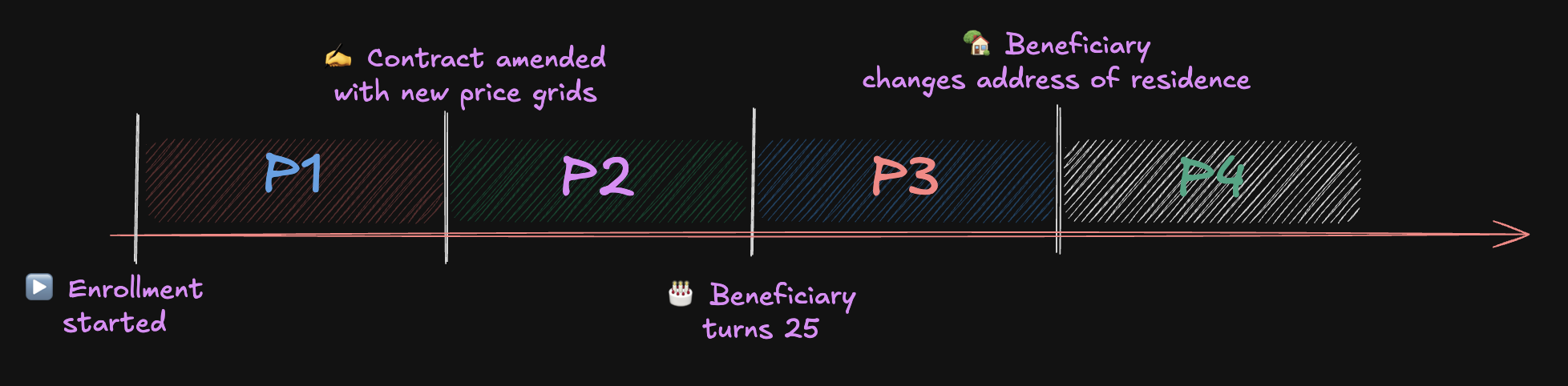
The cost for one month during P2 is different from P1 because the underlying price grids have changed. The cost for one month during P3 is different from P2 because the beneficiary has been bumped to the next age-bracket in the grid. Etc...
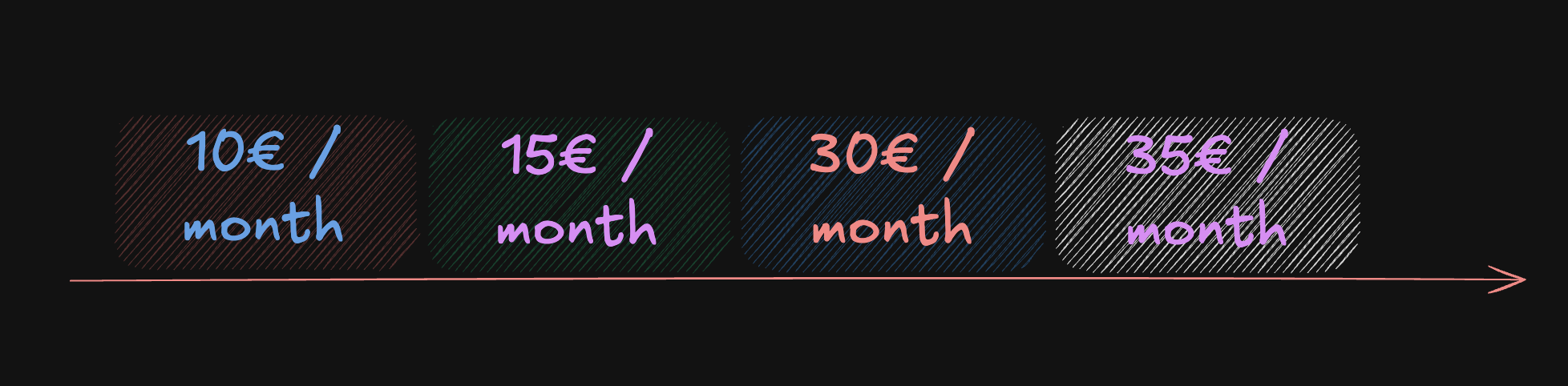
Step 2: map to costs
Now that we have identified all the periods with stable cost, we can resolve the exact monthly price for each period. This resolution is as simple as it seems:
- establish the 'context' of the beneficiary: age, address, reference of price grid
- fetch the price grid and apply our member's context to get our exact monthly price
Step 3: overlap with subscription periods
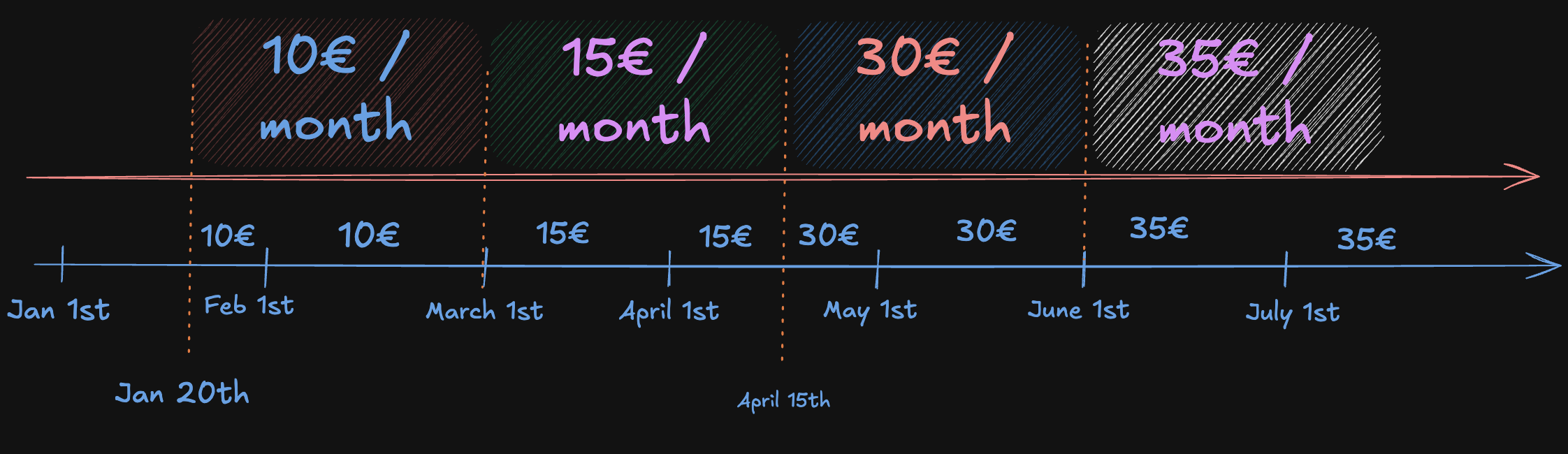
Subscriptions have a 'periodicity'. The most common case is to bill 1 fee per month.
We can picture this as a Timeline where each period is 1 month.
If we overlap both timelines, we are getting closer to defining how much is owed for each month of coverage.
Step 4: proration
We gathered all the information we need to compute our fees. The very last step is to apply our proration rules.
The concept is simple: customers only pay for what they used.
If they were covered for the full month, we use the full month price.
If they were covered for a fraction of the month, they pay for that fraction.
We apply pro-rata on a 30 day basis: (monthly_price) * (num_days_covered) / 30
Proration only triggers when coverage is partial
Proration only applies when num_days_covered differs from the total number of days in the month.
A full month of coverage always costs the full monthly price, regardless of how many calendar days it contains.
This means 28 days in February costs exactly the same as 31 days in January: both are full months.
| Period | Days covered | Monthly price | Fee |
|---|---|---|---|
| January 2026 | 11 | 10€ | 11 × 10 / 30 = 3.67€ |
| February 2026 | 28 | 10€ | 10€ |
| March 2026 | 30 | 15€ | 15€ |
| April 2026 | 14 | 15€ | 14 × 15 / 30 = 7€ |
| April 2026 | 16 | 30€ | 16 × 30 / 30 = 16€ |
| May 2026 | 30 | 30€ | 30€ |
| June 2026 | 30 | 35€ | 35€ |
We have two fees in April! It's a feature, not a bug
Whenever there is an event splitting a billing period, we end up with several fees. Historically, we have applied a few tricks to make sure this never happens: - mid-month amendments are forbidden - birthdays are artificially moved
But the model allows for it and in the future we may get rid of these tricks.
Understanding regularisations
Inputs to the computation can be updated retroactively. It's possible for the price grid used in February 2026 to be updated after the premiums for February.
That is why every entry in the fee table is versioned. When an entry is proven to be outdated:
- we create a second entry to cancel the first one - the original entry and the canceling entry sum up to a total of 0
- and finally we create a third entry representing the new amount
Example
John was enrolled in January 2026. His initial fee was computed at 10€/month (the price in the original contract). In March 2026, the contract is amended retroactively to change the January price to 15€/month. The system regularises John's January fee:
| id | version | period | amount | cancelled_entry_id | cancelled_by_entry_id |
|---|---|---|---|---|---|
A |
1 | January 26 | +10€ | — | B |
B |
2 | January 26 | -10€ | A |
— |
C |
3 | January 26 | +15€ | — | — |
- Entry
Ais the original fee. Based on the data we had at the time, we thought the price for January would be 10€, but turns out we were wrong. It is now cancelled:cancelled_by_entry_id = B. - Entry
BoffsetsA. Its amount is the exact inverse ofA.A + B = 0. - Entry
Cis the corrected fee at the new price. - The net effect for January 2026 is
A + B + C = 0 - 10 + 15 = +15€. ✓
Understanding the format of entries
Introducing components
Payroll, invoicing and finance reporting all require reading the history of fees. To properly do their job, they need more information than the total owed to Alan. In certain scenarios, we need to exclude the amount corresponding to taxes. In others, we need to focus exclusively on the part of the employee. Etc...
To simplify for all consumers, we break up each entry as a list of components. Each component represents a part of the total amount, with the proper labels to help us understand what this specific part corresponds to.
| Property | Description |
|---|---|
amount |
Amount |
service_type |
What service was provided: health coverage base, option, etc... |
debtor |
Who is losing money: company, primary (not to be confused with who receives invoice) |
collection_method |
How we expect to collect: direct, payroll (not to be confused with payment method) |
contribution_type |
What the money is for: pure cost, taxes, membership fee, etc... |
invoice_id |
Is the component invoiced ? |
Summing all components yields the total amount owed to Alan!
PremiumEntry provides methods to extract information out of these components.
Debtors don't always get invoiced !
The debtor property indicates who is ultimately losing money, but it doesn't mean they will receive an invoice from Alan. For example, the part of the employee can be invoiced to the employer and retained from their payslip: the employee never receives an invite.
Debtor = who is ultimately poorer after the dust settles.
Billed entity = combination of (debtor, collection_method).
The underlying logic is coded in PremiumEntry.components_billed_to_debtor()
| Debtor | Collection Method | Billed entity |
|---|---|---|
primary |
direct_billing |
primary |
primary |
payroll |
company |
primary |
flexben_fund |
company |
company |
any | company |
Beyond the various properties differentiating the components from each other, we also have a bunch of shared properties: we can expect all components of the same entry share the same values.
| Property | Description |
|---|---|
premium_entry_id |
All components with the same entry ID belong to the same entry |
enrollment_id |
Identity of the beneficiary |
beneficiary_type |
Identity of the beneficiary |
period_start |
Start of the billing period. Example: Jan 1st 2026 |
period_end |
End of the billing period. Example: Jan 31st 2026 |
num_days |
How many days were actively covered during the period |
currency |
Currency used for all amounts |
version |
Version number for the regularisation system |
cancelled_entry_id |
Relationship to version N-1 |
cancelled_by_entry_id |
Relationship to version N+1 |
Invoice ID is not shared !
A single entry may be billed to several entities.
For example, there could be a 50% company participation, with the employee part billed directly.
In that case we would have components with debtor == company and components with (debtor, collection) == (primary, direct).
These two groups of components would go to two difference invoices: one for the company, one for the employee.
Persistence
When we persist the fees, what we store are actually the components. This gives us a denormalised view of each entry.
On the denormalised view
We could have chosen to persist a PremiumEntryModel with a relationship to a list of components, but we decided to skip the aggregate and store the list of components directly.
The shared property of the entry are duplicated on each component.
There is no strong motivation behind this choice, denormalised felt natural and did not present any obvious drawbacks.
Remember, while the storage is denormalised, the dataclass we use in the domain and business layer (PremiumEntry) is normalised.
Immutability
Once created, components are essentially immutable. Most fields are never updated after insertion.
The only exceptions are:
invoice_id— set when the component is included in an invoicecancelled_entry_id/cancelled_by_entry_id— set when a regularisation links two entries together
All other fields (amounts, debtor, dates, contribution type, etc.) are frozen at creation time. To correct a mistake, a new version is created via the regularisation mechanism — never by updating existing rows.
A final example
John is enrolled on base coverage in January 2026. The total fee is 100€. The contract specifies a 50/50 participation: company pays 50€, employee pays 50€. The employee is billed directly. After 1 month, turns out the price grid is retroactively updated to go from 100€ per month to 110€.
Here is breakdown of what would be persisted.
- 6 components for version 1
- After 1 regularisations, we end up with 18 components total (6 per version).
- Shared context for all entries:
enrollment_id = ENR-1,beneficiary_type = primary,service_type = base,period_start = 2026-01-01,period_end = 2026-01-31,num_days = 31,currency = EUR.
Version 1 (original fee, later cancelled by version 2):
| id | premium_entry_id | version | cancelled_entry_id | cancelled_by_entry_id | enrollment_id | beneficiary_type | service_type | period_start | period_end | num_days | debtor | collection_method | contribution_type | amount | currency | invoice_id |
|---|---|---|---|---|---|---|---|---|---|---|---|---|---|---|---|---|
| 1 | E1 | 1 | — | E2 | ENR-1 | primary | base | 2026-01-01 | 2026-01-31 | 31 | company | — | membership_fee | +500 | EUR | INV-C1 |
| 2 | E1 | 1 | — | E2 | ENR-1 | primary | base | 2026-01-01 | 2026-01-31 | 31 | company | — | cost | +3000 | EUR | INV-C1 |
| 3 | E1 | 1 | — | E2 | ENR-1 | primary | base | 2026-01-01 | 2026-01-31 | 31 | company | — | taxes | +1500 | EUR | INV-C1 |
| 4 | E1 | 1 | — | E2 | ENR-1 | primary | base | 2026-01-01 | 2026-01-31 | 31 | primary | direct_billing | membership_fee | +500 | EUR | INV-P1 |
| 5 | E1 | 1 | — | E2 | ENR-1 | primary | base | 2026-01-01 | 2026-01-31 | 31 | primary | direct_billing | cost | +3000 | EUR | INV-P1 |
| 6 | E1 | 1 | — | E2 | ENR-1 | primary | base | 2026-01-01 | 2026-01-31 | 31 | primary | direct_billing | taxes | +1500 | EUR | INV-P1 |
sum(amount) = 10000 → 100.00€ ✓
Version 2 (cancels version 1, amounts are the exact inverse):
| id | premium_entry_id | version | cancelled_entry_id | cancelled_by_entry_id | enrollment_id | beneficiary_type | service_type | period_start | period_end | num_days | debtor | collection_method | contribution_type | amount | currency | invoice_id |
|---|---|---|---|---|---|---|---|---|---|---|---|---|---|---|---|---|
| 7 | E2 | 2 | E1 | — | ENR-1 | primary | base | 2026-01-01 | 2026-01-31 | -31 | company | — | membership_fee | -500 | EUR | INV-C2 |
| 8 | E2 | 2 | E1 | — | ENR-1 | primary | base | 2026-01-01 | 2026-01-31 | -31 | company | — | cost | -3000 | EUR | INV-C2 |
| 9 | E2 | 2 | E1 | — | ENR-1 | primary | base | 2026-01-01 | 2026-01-31 | -31 | company | — | taxes | -1500 | EUR | INV-C2 |
| 10 | E2 | 2 | E1 | — | ENR-1 | primary | base | 2026-01-01 | 2026-01-31 | -31 | primary | direct_billing | membership_fee | -500 | EUR | INV-P2 |
| 11 | E2 | 2 | E1 | — | ENR-1 | primary | base | 2026-01-01 | 2026-01-31 | -31 | primary | direct_billing | cost | -3000 | EUR | INV-P2 |
| 12 | E2 | 2 | E1 | — | ENR-1 | primary | base | 2026-01-01 | 2026-01-31 | -31 | primary | direct_billing | taxes | -1500 | EUR | INV-P2 |
sum(amount) = -10000 → version 1 + version 2 = 0 ✓
Version 3 (corrected fee, price grid amended to 110€):
| id | premium_entry_id | version | cancelled_entry_id | cancelled_by_entry_id | enrollment_id | beneficiary_type | service_type | period_start | period_end | num_days | debtor | collection_method | contribution_type | amount | currency | invoice_id |
|---|---|---|---|---|---|---|---|---|---|---|---|---|---|---|---|---|
| 13 | E3 | 3 | — | — | ENR-1 | primary | base | 2026-01-01 | 2026-01-31 | 31 | company | — | membership_fee | +550 | EUR | INV-C2 |
| 14 | E3 | 3 | — | — | ENR-1 | primary | base | 2026-01-01 | 2026-01-31 | 31 | company | — | cost | +3300 | EUR | INV-C2 |
| 15 | E3 | 3 | — | — | ENR-1 | primary | base | 2026-01-01 | 2026-01-31 | 31 | company | — | taxes | +1650 | EUR | INV-C2 |
| 16 | E3 | 3 | — | — | ENR-1 | primary | base | 2026-01-01 | 2026-01-31 | 31 | primary | direct_billing | membership_fee | +550 | EUR | INV-P2 |
| 17 | E3 | 3 | — | — | ENR-1 | primary | base | 2026-01-01 | 2026-01-31 | 31 | primary | direct_billing | cost | +3300 | EUR | INV-P2 |
| 18 | E3 | 3 | — | — | ENR-1 | primary | base | 2026-01-01 | 2026-01-31 | 31 | primary | direct_billing | taxes | +1650 | EUR | INV-P2 |
sum(amount) = 11000 → 110.00€ ✓
Net effect across all 18 components: 10000 - 10000 + 11000 = 11000 → 110.00€ ✓
Understanding the scope of each computation
We never compute fees for individual enrollments, despite the components themselves operating with a resolution on enrolment level. The smallest unit of computation is one policy.
Family pricing schemes can only be applied properly when considering the household as a whole
Imagine an offer such as "3rd child is free". If we were to compute enrollment per enrollment, we wouldn't know how many children are in the household.
The simplest workaround is to always compute fees for the entire household at once.
Adding a table for a new product.
PremiumComponentModel is abstract. Each product must subclass it, in the schema of the corresponding country.
One day, we will probably move every premium entry to the same table regardless of country & product, but not today.
See this notion doc on 'why' ⧉.
from sqlalchemy.orm import declared_attr
from components.premium.public.models.premium_component import PremiumComponentModel
from components.premium.public.models.prefix_table_args import prefix_table_args
from shared.models.helpers.schemas import XX_SCHEMA

class XxPremiumComponentModel(PremiumComponentModel):
    __tablename__ = "premium_component"

    @declared_attr
    def __table_args__(cls):
        return prefix_table_args(PremiumComponentModel.__table_args__, "xx_") + (
            {"schema": XX_SCHEMA},
        )
SQLAlchemy tracks constraint and index names in a global registry keyed by name alone (not by schema), so two subclasses with the same __tablename__ will collide unless each prefixes its names (e.g. "es_", "be_").
prefix_table_args is a small helper used to rename constraints and indexes, and must absolutely be used.
Another small wrinkle is all tables use the same enums. Everytime a new table is introduced based on the shared model, the Alembic generated migration will try to re-create the enum...
The migration file must be edited to replace every sa.Enum(...) for an enum column in op.create_table with
postgresql.ENUM(..., create_type=False):
from sqlalchemy.dialects import postgresql

# inside op.create_table:
postgresql.ENUM("base", "option", ..., name="insuranceservice", create_type=False)
EsPremiumComponentModel (components/es/internal/premium_computation/models/) is the
reference implementation, as the 2nd table introduced based on that model.